
SSO Registration is the process of creating an account on the Rajasthan Single Sign-On platform. The portal provides different registration options for citizens, businesses, and government employees. Once an account is created, users can sign in and access the online applications and services available for their category.
Steps to Create a Rajasthan SSO Account
The registration procedure depends on the type of user. Select the appropriate category on the portal and provide the information requested during registration.
Citizen Registration Process
Rajasthan residents can create an SSO account by selecting the citizen registration option. The general process includes:
- Open the Official Portal: Visit the Rajasthan SSO website and open the registration section.
- Select Citizen: Choose the Citizen option from the available user categories.
- Enter Personal Information: Fill in the details requested on the registration form.
- Create a Password: Set a secure password for your new SSO account.
- Complete Mobile Verification: If OTP verification is requested, enter the OTP received on your registered mobile number.
- Submit the Form: Review the information and follow the instructions shown on the screen to finish registration.
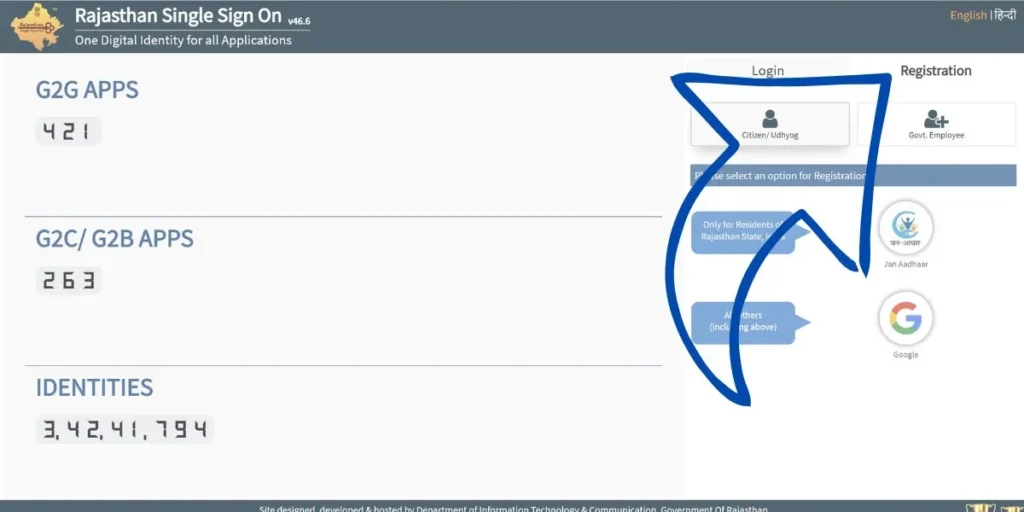
After successful registration, the SSO credentials can be used to access services available to the account.
Registration for Udyog and Business Users
Business owners and eligible organizations can use the Udyog category to create an SSO account. The information required may differ from the citizen registration process.
- Open the official Rajasthan SSO Portal and select the registration option.
- Choose Udyog as the applicable user category.
- Enter the required business or organization information.
- Create a secure password for the account.
- Complete any verification requirements shown by the portal.
- Review the details and submit the registration form.
Once the process is completed, business users can sign in and use the applications made available for their account.
SSO Registration for Government Employees
Government employees have a separate registration route based on their employment information. To proceed:
- Open the official Rajasthan SSO registration page.
- Select the Government Employee category.
- Enter the required employee and department-related information.
- Create the requested login password.
- Complete the applicable identity or employment verification.
- Submit the details and finish the registration process.
The information and verification requirements may vary according to the employee’s department and the services being accessed.
Information Required for SSO Registration
Before starting the registration process, users should keep the information required for their selected category ready. Personal details may be required for citizen accounts, while business or employment information may be needed for other categories.
If the portal asks for OTP verification, access to the registered mobile number is necessary. Users should also ensure that the information entered in the registration form is accurate before submitting it.
What Happens After Registration?
After successfully creating an SSO account, users can sign in with their registered credentials. The account dashboard provides access to the applications and services available according to the user’s category and eligibility.
The Rajasthan SSO system is designed to provide a common account for accessing multiple digital government services, making it easier for registered users to manage their online applications from one place.
Keep Your SSO Account Secure
After completing the SSO Register process, keep your SSO Login credentials confidential. Do not share your password or OTP with other people. If you notice any unusual account activity, use the security or account-management options provided through the official portal.