
If you’ve forgotten your SSO ID or password, don’t worry — recovering it is simple. Just follow the steps below to restore access to your Rajasthan SSO account quickly.
- Go to the Rajasthan SSO official portal: Launch your web browser and open the official SSO website.
- Select “Forgot Password”: On the sign-in screen, locate and click the “Forgot Password” link.
- Fill in your saved details: Enter the mobile number or email ID that is linked with your SSO account.
- Complete identity verification: Verify yourself by entering the OTP that gets sent to your registered mobile number.
- Set up a fresh password: Follow the prompts shown on screen to create a strong, secure new password.
- Re-type to confirm: Enter the new password once more to make sure it matches.
- Access your account: Once your password has been successfully changed, log back into your SSO account using your ID and the newly created password.
Simple Way to Reset Your SSO Password Using a Mobile Number
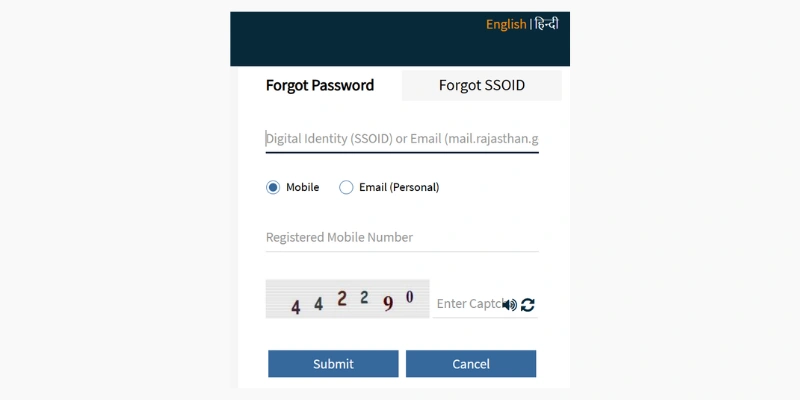
If you’d like to recover your SSO portal password through your mobile number, here’s what to do:
- On the password recovery screen, type in your SSOID and your email ID.
- Choose the ‘Mobile’ tab and key in your registered mobile number.
- Solve the captcha and hit ‘Submit’.
- You’ll receive a reset link on your registered mobile number — use it to set up a brand-new password for your SSO account.
Fast Way to Recover Your SSO ID and Password Using Email
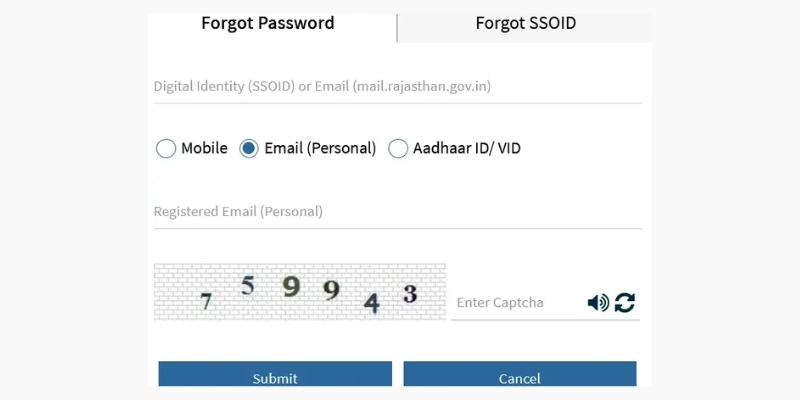
Want to reset your SSO password through your registered email address? Here’s the process:
- Head to the recovery screen and enter your SSOID along with your registered email address.
- Pick the ‘Email’ option and type in your email ID.
- Fill in the captcha and click ‘Submit’.
- Open your email inbox, find the password reset link, and follow the steps to create your new password.
How to Recover Your SSO Password Using Aadhaar ID/VID
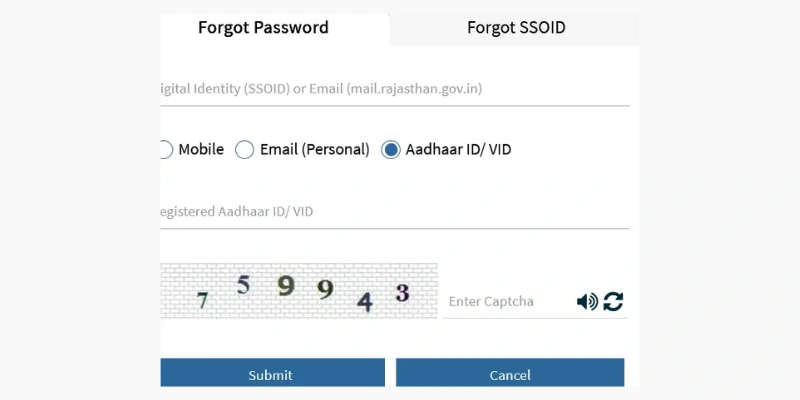
To reset your SSO portal password with the help of your Aadhaar ID or VID, follow these steps:
- On the recovery screen, enter your SSOID and email address.
- Select ‘Aadhaar ID/VID’ and input your registered Aadhaar number.
- Type in the captcha code and press ‘Submit’.
- A reset link will be sent to your registered mobile number, which you can use to set a new SSO password.
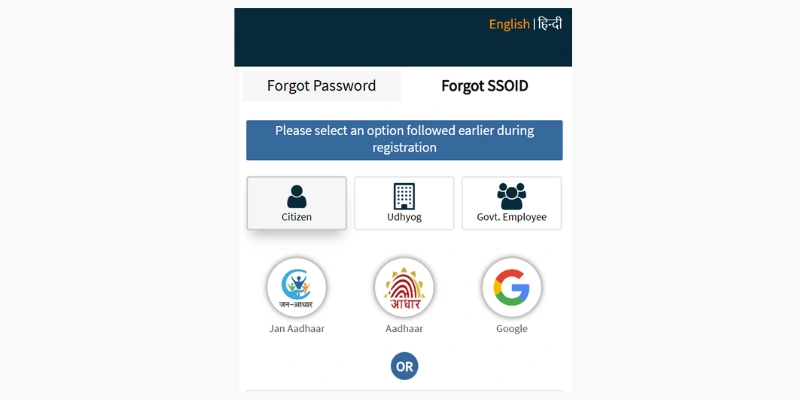
Recovering a Forgotten SSO ID Using the Citizen Option
If you registered your SSO ID under the Citizen category, here’s how you can get your ID back:
- Open the official Rajasthan SSO website.
- On the homepage, click “I forgot my Digital Identity (SSOID).”
- You’ll land on a new page where you need to choose the Citizen option.
- Enter one of the following IDs that you used at the time of registration:
- Jan Aadhaar ID
- Bhamashah ID
- Aadhaar ID
- Facebook account
- Google account
- Twitter account
5. Once verified, your SSO login ID will be sent to your registered mobile number or email address.
Recovering a Forgotten SSO ID Using the Udhyog Option
If Udyog was your chosen registration category, follow these easy steps to recover your ID:
- Visit the official Rajasthan SSO website.
- Click on “I forgot my Digital Identity (SSOID)” on the homepage.
- A new page will open where you must select the Udyog option.
- Enter one of the following IDs used during registration:
- Udyog Aadhar
- SAN (Sanstha Aadhaar Number)
5. Fill in the remaining required details.
6. After verification is complete, your SSO login ID will be sent to your registered mobile number or email.
Recovering a Forgotten SSO ID Using the Govt Employee Option
If you signed up under the Government Employee category, use these steps to recover your ID:
- Go to the official Rajasthan SSO website.
- Click “I forgot my Digital Identity (SSOID)” on the homepage.
- On the new page, select the Government Employees option.
- Next, enter your State Insurance and Provident Fund (SIPF) number along with your password.
- Once your details are verified, your SSO login ID will be delivered via the portal, your registered mobile number, or your email address.